For you computer or laptop users with Windows operating system have certainly experienced or even currently experiencing obstacles where on the desktop screen often appears notifications Your Windows License Will Expire Soon, You Nedd to Activate Windows in Setting.
Thinfifie indicates that the active period of Windows is approaching the expiration period and needs to be re-activated. If the Windows Activation process is not done, the notification will often appear and of course very disturbing comfort when the computer or laptop is in use.
Through this post I will share a tutorial on how to get rid of notifications Your Windows License Will Expire Soon, You Nedd to Activate Windows in Setting or more precisely how to easily activate windows 10 or Windows 10 without the need to use Key Products from Microsoft in other words 100% gratis. (how to activate Windows 10 and Windows 11 pro without product key)
This only does not need to be at length unveiling, all you need is Activation HWID Digital License Activation. Please download the application before proceeding to the activation steps of Windows 10 and Windows 11 which I will share the following:

After you download directly run the Application in the right Klick way then select Run as Administrator Option. But make sure before running this Application you Disable Additional Antivirus, Windows Built-in Antivirus, and Windows Firewall.

Select Options [2] HWID Activation - Windows 10, 11 by typing the number 2 then press Enter and wait for the activation process to run by itself.

The green notification appears Windows 10 Pro is Permanently Activated which signifies the activation process of Windows 10 or Windows 11 that you use successfully and permanently.

What if you are not sure, you can open Windows Explorer and then Klick Kanan This PC then select Properties Option.

After Select the Change Product Key or Upgrade Your Edition of Windows option
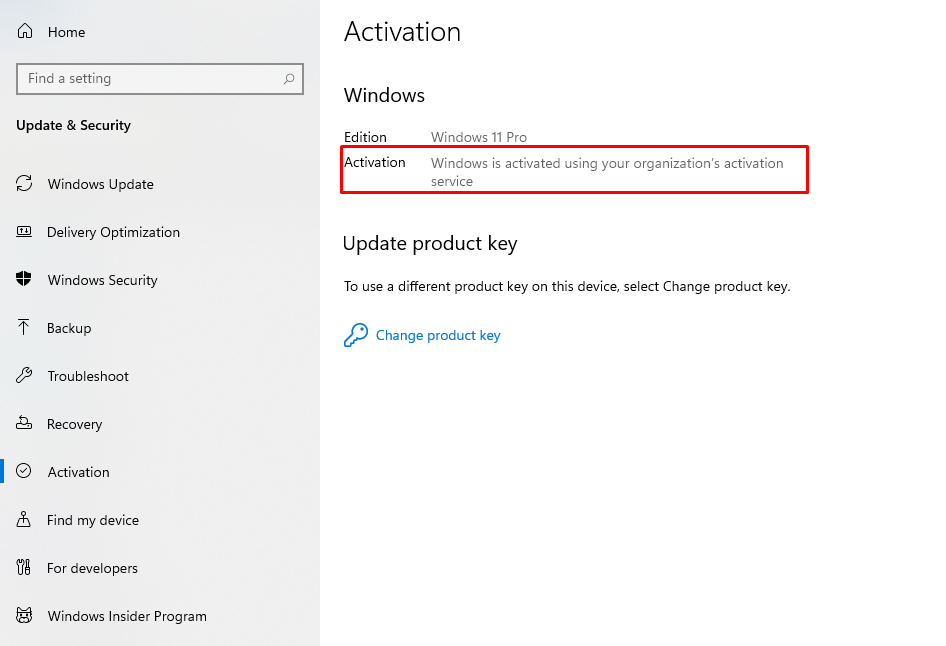
In the screenshot above in the Activation section, there is a description of Windows is activated using your organization's Activation Service.
The Tutorial Guide how to easily activate Windows 10 and Windows 11 Pro without key gratis products with permanent results that you can try to practice. Thank you for visiting Online Tutorial Sharing, Share this tutorial with colleagues in need!