One of the requirements that must be met and uploaded in the online filing for the Appointment of PPPK Candidates on the sscasn.bkn.go.id application is a Certificate of Physically and Spiritually Healthy Body issued by a Doctor from a Government Hospital.
Of course, in the process of making a Certificate of Physically and Spiritually Healthy, we have to come directly to the Hospital that serves Physical and Spiritual Tests and there will certainly be a long queue. Therefore, the Lampung RSJD in collaboration with the Lampung Provincial Government opened online registration through the Rojana Application to provide Spiritual Health Test (MMPI) services to PPPK Candidates in making a Certificate of Physically and Spiritually Healthy
In this post, I will share my experience on how to register online for participants of the Spiritual, Physical, and Drug Health Test through the Rojana Application of the RSJD Lampung. in the registration process, we must really take advantage of our free time because in one day the quota of test participants is only 450 participants per day other than Friday.

visit the Page website for the Rohani Test Application at RSJ Lampung then use your email or WhatsApp number to register for an account.
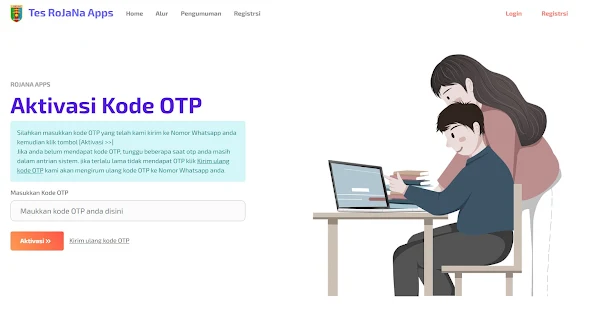
Enter the OTP code that was sent to your email or WhatsApp number, then click Activation. Fill in the RoJaNa Test Registration Form starting from the Full Name, NIK KTP, WhatsApp Number, and so on.

After you have finished creating a RoJaNa Application Account, continue to log in using the email and password that you created earlier.

Enter your RoJaNa account email and password, then click Login

An identity window appears, please fill in according to your personal data

Click Save Data after you finish inputting the requested data

Then upload a RoJaNa Account Profile Photo, it is recommended to use a formal photo

After completing your personal data and RoJaNa account profile photo, click on the Service Order menu

Unfortunately here I can't continue the registration until the payment process, due to the test schedule falling on the red date of the new year AD 2022. So I was directed to re-order again tomorrow.

That's a tutorial guide on how to easily register an online RoJaNa Application Account at the RSJD Lampung to take a Spiritual Health Test and Making a Certificate of Physically and Spiritually Healthy as one of the requirements for the Appointment of Candidates for Teacher Teacher Training for the 2021 Fiscal Year.