In a previous post, I discussed a tutorial on how to bypass the FRP Google Account Samsung A10s finger exercise method without a PC. However, this method sometimes doesn't work on Android Samsung A10s even though it's according to the procedure.
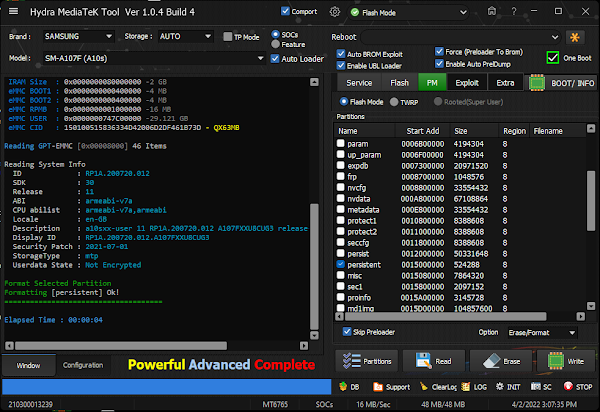
So in this post, I will discuss a tutorial on how to bypass FRP Samsung A10s using another method, namely using the Hydra MediaTek Tool application. I just found out about this method, where I don't think any Samsung Android uses the Mediatek chipset, and as far as I know, all use Exynos.

- Run the Hydra MediaTek Tool Application
- Band option select SAMSUNG, Model SM-A107F (A10s)
- Uncheck enable UBL Loader and Enable Auto PreDump
- Select the Service Tab, Click Boot/Info
- Connect the Samsung A10s in the Off position while pressing the button volume Up and Down Simultaneously
- After the Samsung A10s Device is read perfectly Click the PM tab
- Click Partitions, then check the persistent list
- Click Erase, and wait for the process
- Done
That's the Tutorial Guide on How to ByPass FRP Samsung A10s SM-A107F with the Hydra Mediatek Tool that you can try to practice yourself at home. Good luck and good luck